
Introduction
The REST API is based on REST principles. Our resource oriented URLs are only accessible via HTTPS and are available in both our test and live environments.
We use HTTP Authentication and HTTP verbs for each method:
| Verb | Description |
|---|---|
| GET | for retrieving resources. |
| POST | for creating resources. |
The API uses JSON format for both requests and responses.
Getting your API credentials
Before you can start integrating with our REST API you need to get your Token Key , you need to do the following:
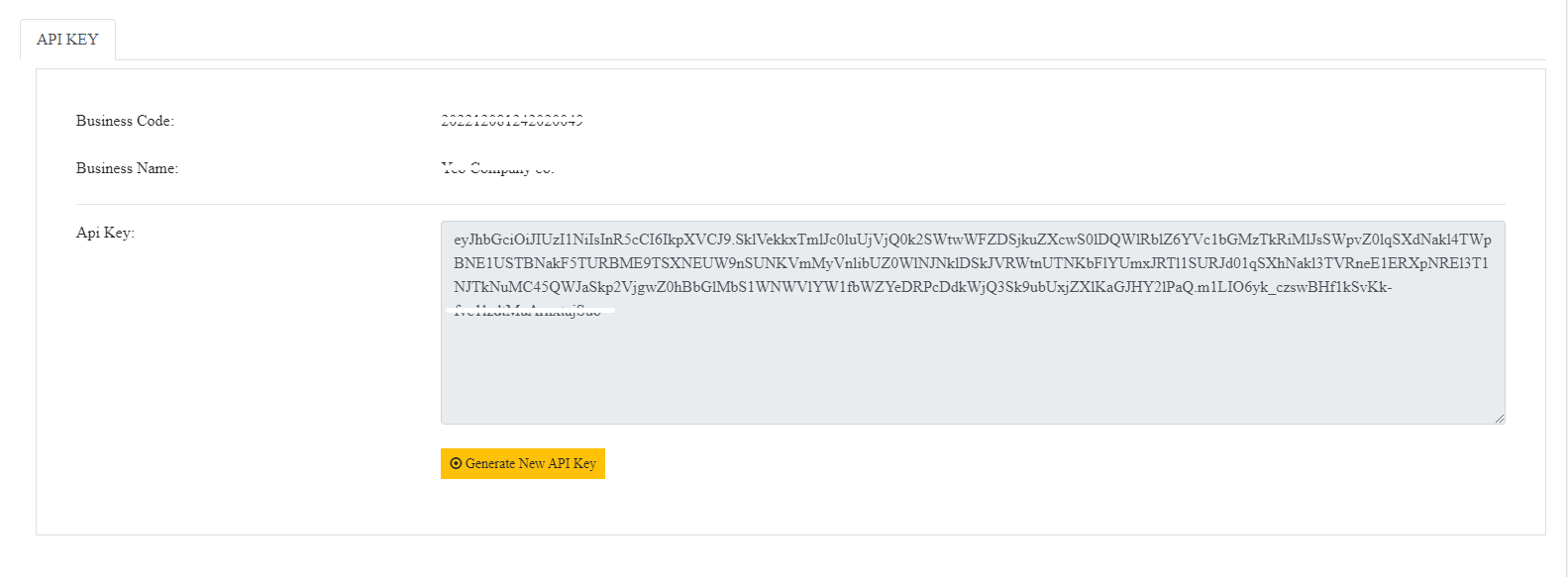
- Go to IVoucer web login to your business and open API Key page.
- Copy it, And keep key with send the request.
- Let use token key for bearer token authentication
Please store these credentials safely. If you lose them, you will need to generate a new set of credentials using the same process.
Please note that these credentials are only valid for our REST API.
Getting Started
The REST API is available to all clients and returns easy to use JSON on all responses. All requests should be made over HTTPS and to the endpoint {currentURL}.
If you would like to test the API quickly, we recommend using Postman. To get you started faster
Authentication
Requests to the API require authentication. We use HTTP Basic authentication or Bearer authentication, yet secure method of enforcing access controls.
In order to access our protected resources you must authenticate with our API by providing us with your
Basic authenticate :
- Username : Token Key
- Password : Required for Basic Authentication
How to basic authenticate :
- You need to combine into string username and password as per example: Username:Password
- The combined string will have to be encoded using Base64 encoding.
- HTTP Basic authentication combined with encoded string will have to be included in the Authorisation header.
Bearer authenticate : (Recommend)
How to Bearer Token :
- Using HTTP Bearer authentication, you can get via Simply Manage Voucher portal , Your account key is combine into a string TokenKey.
- The string will have to be included in the Authorization header.
Vouchers
You can get the details of a voucher and all its history using voucher number called "VoucherCode". You can do this 2 ways:
- Send request method GET: /api/VoucherSold/VoucherCode/{Your voucher code}
- Send request method POST: /api/VoucherSold
Please included token in the Authorization header of request.
if not you will get response message : "Unauthorized,You must provide a valid key to access."
The response detail including
| Attribute | Description |
|---|---|
| Balance | value balance of this voucher |
| CreateDate | date of sold a voucher |
| IsComplimentaryVoucher | true/false for Complimentary Voucher |
| IsPhysicalPlasticCard | true/false for Plastic Card |
| VoucherAlias | Alias text 8 digit for refer to full Voucher Code |
| Description | Description of Voucher, Display on card max 170 character |
| Message | message from purchaser to recipient |
| PurchaserEmail | email of purchaser |
| PurchaserName | name of purchaser |
| RecipientAddress |
address of recipient and include.
|
| RecipientEmail | email of recipient |
| RecipientName | name of recipient |
| Redeem |
the history redeem of this voucher.
|
| Refill |
the history refill of this voucher.
|
| VoucherName | name of voucher |
| Value | value of voucher |
Voucher Sale Add
You can add new voucher sale by send the detail including
| Attribute | Description | |
|---|---|---|
| VoucherName | name of voucher | |
| VoucherValue | value of voucher | |
| VoucherAlias | Alias text 8 digit for refer to full Voucher Code | Optional |
| Description | Description of Voucher, Display on card max 170 character | |
| Message | message from purchaser to recipient | |
| PurchaserEmail | email of purchaser | |
| PurchaserName | name of purchaser | |
| RecipientEmail | email of recipient | |
| RecipientName | name of recipient | |
| IsComplimentaryVoucher | true/false for Complimentary Voucher | Optional |
| IsPhysicalPlasticCard | true/fasle for require PhysicalPlasticCard | Optional |
| AddressLineOne | address of recipient line one | Required field only in case physical plastic card value is true |
| AddressLineTwo | address of recipient line two | Optional |
| CityName | phone of recipient | Required field only in case physical plastic card value is true |
| CountryCodeName | code of country | Optional |
| CountryName | country name of recipient | Required field only in case physical plastic card value is true |
| PhoneNumber | phone of recipient | Required field only in case physical plastic card value is true |
| PostCode | postcode of recipient | Required field only in case physical plastic card value is true |
The response:
- Message : response message from api
- IsSuccess : true/false
- VoucherSoldCode : code of sold
- VoucherCode : code of voucher
Voucher Redeem
You can redeem voucher by send the detail including
| Attribute | Description | |
|---|---|---|
| VoucherCode | a code of voucher | Required |
| Amount | value want redeem | Required |
| Description | the description for this redeemtion | Required |
The response:
- Message : response message from api
- IsSuccess : true/false
- RedeemCode : code of redeem
- VoucherCode : code of voucher
Voucher Refill
You can refill a value of voucher by send the detail including
| Attribute | Description | |
|---|---|---|
| VoucherCode | a code of voucher | Required |
| Amount | value want refill | Required |
| Description | the description for this refill | Required |
The response:
- Message : response message from api
- IsSuccess : true/false
- RefillCode : code of refill
- VoucherCode : code of voucher